

Documentation Index
Fetch the complete documentation index at: https://docs.micro.so/llms.txt
Use this file to discover all available pages before exploring further.
Y Simulator and the Plugin Drop
Seven new plugins, cover art across the Marketplace, and 27 reasons to open it.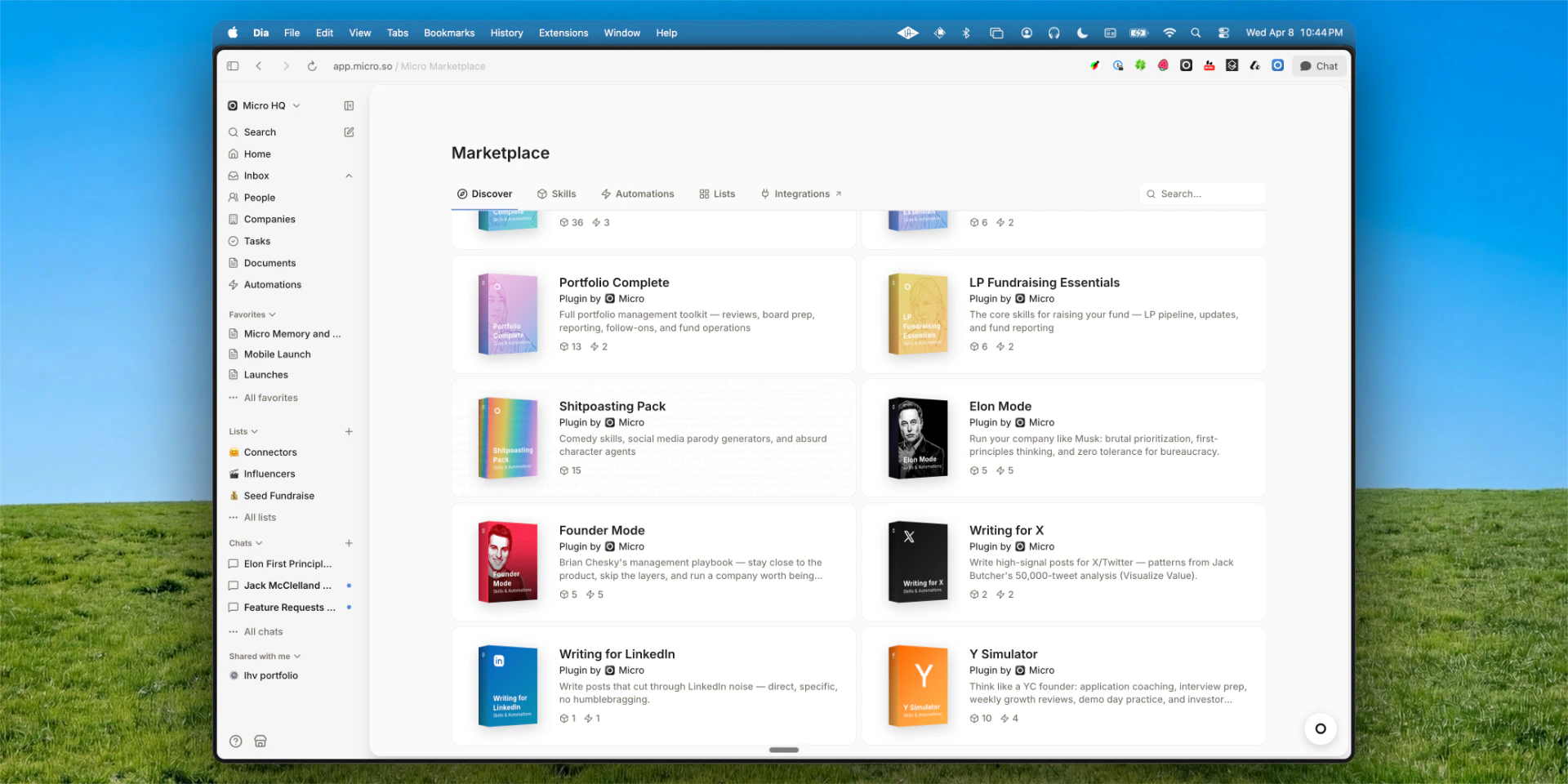
Y Simulator
A complete YC co-founder in your pocket. 10 skills and 4 automations built for founders going through YC — or who wish they were. Talk to Users, Office Hours Prep, Demo Day Pitch, Investor Update, Series A Readiness, and more. Four automations run on a schedule: batch check-ins Mon/Wed/Fri, weekly growth review, demo day countdown, and monthly investor update. Install it from the Marketplace.6 More Plugins — 27 Total
Elon Mode, Founder Mode, Writing for X, Writing for LinkedIn, and Sales all dropped this week. Every plugin now has cover art. Browse them in the Marketplace.Daily Orchestrator
A new automation that runs at 4:44 AM every day. It reads your memory and context docs, scans the next 24 hours, and queues up exactly what you need — meeting prep, follow-up drafts, deal alerts, research briefings. By the time you open Micro, your morning briefing is already waiting. Find it in the Automations tab or Marketplace.Integrations: Granola, Notion, Linear, Stripe, Mem, Zapier
Six new MCP integrations are available in Settings → Integrations. Connect Granola and the AI can pull from your meeting transcripts. Connect Notion, Linear, Stripe, Mem, or Zapier and it works the same way — just ask naturally in chat. Find them via Marketplace → Integrations.X Agent Upgraded
The AI can now browse your home timeline, manage bookmarks (read, add, remove), follow and unfollow users, unlike posts, and unretweet — all from chat. Connect your X account in Settings > Connected Accounts.Edit Your Skills
Tell the agent to edit any of your user-created skills — name, command, description, instructions. Just ask: “update my Sales Setup skill to include…”. System skills are protected.More Improvements
- When you open chat from inside an app, follow-up messages now keep the app context (no more “which pipeline?” on message 2)
- Sub-agents can now handle longer tasks — delegation limits bumped from 8 to 15 iterations
- New docs auto-focus the title field on creation
- Deal CSV import resolves contacts by email and companies by domain
- People CSV import now accepts the email column
Bug Fixes
Fixed 11 underlying agent issues that caused basic functionality to fail silently — stale tool calls, swallowed errors, dropped context. AI chat streaming is smooth again. Doc mention search works when the query includes a space. Composer bullet and numbered list markers display correctly. Skill settings page fully restored.Watch Your Agent Work
Sub-agent transparency, a Slack messaging integration, and a big X upgrade.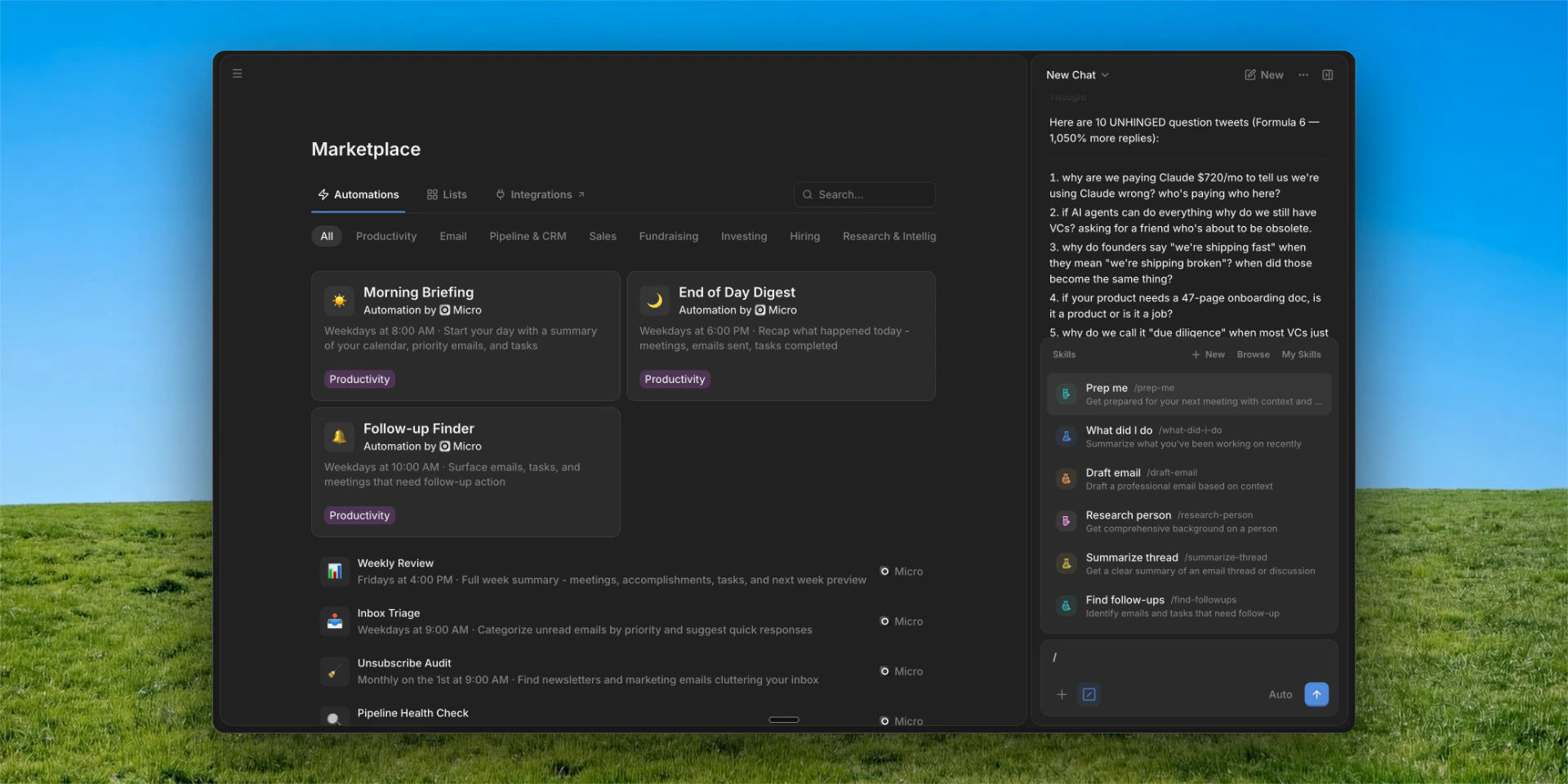
🛍️ Marketplace
A new Marketplace page lets you browse and install plugins, automations, lists, and integrations — all in one place. Find it in the sidebar. Tabs: Discover, Skills, Automations, Lists, and Integrations.🔍 Sub-Agent Activity Panel
When the AI delegates work to a specialized sub-agent, you can now watch it happen in real-time. A collapsible panel in chat shows which sub-agent is running, its live tool calls as they stream, and a summary when it finishes. No more wondering what’s happening under the hood.🤖 Agent Upgrades
A batch of meaningful AI improvements shipped this week. The agent now shows a live status indicator while it works — “preparing context”, “thinking”, etc. — with messages that vary by agent personality. On X, the agent went from 10 tools to 14: post threads (2–25 tweets), reply, quote-tweet, upload media, and delete. For email, the agent now confirms before sending — you’ll see a full preview before anything goes out. Reply drafts also now thread correctly. And chat cold start is significantly faster — second request ~52% faster, third+ ~90% faster.💬 Slack Messaging
You could already search Slack with Micro’s Deep Search integration. Now the agent can also read messages and send to channels — useful for following up on deals or drafting messages without context-switching.✨ More Improvements
- Document cards appear in chat while the agent is still calling the tool — no waiting
- Chat drafts survive page reloads and tab switches
🐛 Bug Fixes
AI chat scroll jank during streaming is fixed, the chat window no longer closes when the agent opens a record, team and CRM invite links work again, slash command keyboard navigation is fixed, Team Members property values now save correctly, and sending emails with attachments works.Beta Features: Live Meetings, WhatsApp, and Deal Imports
A new Beta Features section in Settings lets you opt into upcoming capabilities before they go GA — plus CSV import for deals and a handful of polish fixes.Beta Features in Settings
Settings > Beta Features now lets you opt into early-access capabilities. Three are available today: Live Meeting Intelligence, Meeting Follow-up Tasks, and WhatsApp. Find them at Settings > Beta Features.Live Meeting Intelligence (Beta)
When enabled, the AI streams real-time insights, talking points, and contextual questions during your live meetings — enriched with the CRM profiles and email history of everyone in the room. Enable “Live Meeting Transcript” in Settings > Beta Features.Meeting Follow-Up Tasks (Beta)
After a meeting ends, Micro reads the transcript, extracts action items, and creates tasks automatically — with AI-written descriptions, due dates, and a link back to the calendar event. Enable “Meeting Follow-up Tasks” in Settings > Beta Features.WhatsApp (Beta)
The AI agent can browse your WhatsApp chats and read message history — useful for recalling last talking points or surfacing context before a call. Read-only for now. Enable “WhatsApp Integration” in Settings > Beta Features.Deal CSV Import
Import deals from CSV the same way you import contacts and companies. Download the deal template from any deal app, map your columns, and import with full field validation.More Improvements
- New agent infrastructure (Mastra v1) is live — should improve performance and unlock new features coming next week
- AI chat is more reliable — fixed the recurring message save errors on long threads so conversations no longer get interrupted
- The agent now reads full email bodies (not just snippets) when drafting replies, and sent emails are included in conversation context
- Kanban drag-and-drop is smoother — drop indicators now appear when moving cards across columns, columns no longer shift when scrolling, and stage headers stay visible during auto-scroll
- Kanban views no longer have a column limit
- Work history and education entries on contact profiles are now clickable — open the organization directly from the timeline
Bug Fixes
AI chat citations and document preview cards render correctly again, stop and retry/copy buttons appear at the right time during generation, keyboard shortcuts no longer get hijacked while typing in chat, and a profile crash on certain accounts is resolved.Better Onboarding, Lower Price
A redesigned onboarding experience, a price drop, and a lot of polish.💰 $29/mo
Standard plan dropped from 29/mo. Same product, lower price.👋 Onboarding Overhaul
The onboarding flow has been completely redesigned — reordered steps, a live network graph that animates while your data syncs, and a conversational AI setup that configures your workspace for you. Type/onboarding in the AI chat to try it. It’s pretty magical.🤖 Smarter AI
The AI assistant got a big upgrade this month. You can now send follow-up messages while the agent is still responding — they queue up and fire in order, so back-and-forth feels natural. Import your memories from ChatGPT, Claude, Gemini, or Grok so the agent has your context from day one (Settings > Connected Accounts). Chat threads now show status indicators and unread counts. Prompts have been renamed to Skills. And broad reliability improvements to response quality, email formatting, signatures, and draft behavior.✨ More Improvements
- Properties look and feel much more beautiful and easy to edit — Notion-style inline editing for text, numbers, selects, refs, and links
- Email thread sidepanel redesigned with collapsible participant cards and hover previews
- Full-screen lightbox for image and PDF attachments
- Mailto links open Micro’s composer
- Improved @mention experience in AI chat input
- Attachment search across accounts
- Settings layout refresh
- Credit system with token usage caps — automations auto-pause when credits are exhausted
- Self-serve account deletion
🐛 Bug Fixes
Images in emails display correctly again, login redirect issues resolved, email views filter properly, property editing works in all contexts, kanban drag-and-drop saves reliably, activity pages load consistently, and several smaller fixes across the app.Smarter AI, Better Defaults
A big month of polish and intelligence improvements across the entire platform.🤖 Auto Model Selection
The AI assistant now automatically picks the right model tier (Fast, Standard, or Pro) based on your query complexity. Simple questions get instant answers; complex research tasks get deeper reasoning. You can still override manually.💡 Suggested Follow-Ups
After each AI response, you’ll see clickable follow-up suggestions — so you can keep the conversation going without typing.📄 Inline Document Preview
When the AI references a document in chat, it now shows a rich preview card you can click to open the full document.🔄 Background Chat Streaming
Switch between chat threads while the AI is still generating a response. It keeps working in the background and you’ll see the result when you switch back.📋 Default Views Overhaul
Every page — inbox, tasks, people, companies, and all list templates — now ships with better default views and quick filters. New quick filters let you toggle common filters (like hiding Done or Spam) without cluttering the filter panel.📚 Context Docs Overhaul
Context docs are now first-class objects. Each list has a Context Docs section in its Autofill settings where you can add, edit, and delete context documents. When you create a new list, the AI automatically generates a starter context doc based on your email history and company info.✨ Autofill in App Header
A new Autofill button in the list header gives you quick access to autofill settings and context docs — no more digging through menus.📝 Agent Writes Summaries
When the agent learns important information about a person or company (via the Remember tool), it now writes a summary to their profile automatically.🎯 Deal Autofill
AI Autofill now works on deal record types, not just people and companies.🏷️ Automation Run Titles
Automation runs now get AI-generated descriptive titles so you can scan your run history at a glance.📊 Doc Kanban View
Documents in CRM lists can now be displayed in kanban layout, grouped by status.🎙️ Per-Account Meeting Settings
Configure meeting bot recording preferences independently for each connected account. New accounts default to recording external meetings only.🔒 Gmail Send Permissions
Compose, reply, and forward are now gated behind explicit Gmail send authorization — giving you more control over what Micro can do with your email.⚡ Performance
Profile pages load significantly faster with lazy-loaded tabs and optimized data fetching. Avatar fallback icons are now lightweight custom SVGs.🐛 Agent Reliability
Multiple fixes for agent “amnesia” — lost context during long conversations, delegation handoffs, and memory compaction. Email drafting, signatures, and formatting also improved.AI Agent Superpowers
The Micro AI agent just got a massive upgrade. Here’s what’s new:🧠 Agent Memory
The agent now remembers your preferences across conversations. Tell it once how you like your emails drafted or what your investment thesis is, and it remembers. A “Remembered” badge shows in chat when the agent saves something.📄 Document CRUD
The agent can now create, edit, and update documents on your behalf. Ask it to draft a meeting recap, create a project brief, or update your notes.🔍 Vault Search
Unified search across your entire workspace — emails, docs, contacts, calendar, and more — all from within the AI chat. Powered by Hyperspell with multi-account support.🔗 Graph Traversal
The agent can now navigate relationships between objects. Ask “who at Sequoia have I met with this quarter?” and it traverses contacts, companies, and calendar events to find the answer.🎨 Image Generation
Generate images directly in chat with style presets and quality tiers. Great for quick mockups, social media assets, or brainstorming.📊 Mermaid Diagrams
The agent can create flowcharts, org charts, and other diagrams right in chat using Mermaid syntax.⚡ Full Automation Suite
Create, schedule, and manage automations from the AI chat. New template gallery, detail views, and tile-based layout for managing your automations.💬 Chat Input Redesign
The AI chat input got a complete redesign — slash command picker, @mentions, model tier picker, and a new voice mode with waveform visualization.🔔 Push Notifications
Get notified on your phone when new emails arrive (iOS). Email notifications for meeting summaries and product updates also available.💪 Warmth Scoring Rebuild
Relationship strength now uses absolute scoring with recency decay instead of percentile ranking — giving you a more intuitive read on how strong your connections are.🧹 Data Quality
Email address normalization prevents duplicate contacts. Enrichment rejects junk values. Inline attachments and tracking pixels are filtered out of attachment lists.🎯 Autofill Settings Panel
New dedicated panel for configuring per-property autofill settings — accessible from any list. Auto-revalidation means views refresh automatically after the agent makes changes.👋 Onboarding Improvements
After onboarding completes, the AI chat opens automatically with/onboarding to help you set up your workspace conversationally. Two-phase email sync gets your sent emails loaded first.🔐 Security
SQL injection fix, Clerk webhook signature verification, and admin-only member deletion.UI Polish & Meetings Upgrade
A huge batch of UI improvements and a major upgrade to meetings and calendar.🪪 Hover Cards
Hover over any person, company, event, task, or document chip to see a rich preview card with key info and quick actions — no need to navigate away.📋 Activity Feed Overhaul
Activity feeds on profiles now group related events, show clearer timestamps, and are much easier to scan.⭐ Sidebar Favorites
Pin your most-used lists, people, and companies to the sidebar for instant access.💬 Dedicated AI Chat Page
AI Chat now has its own full page at/chat in addition to the floating popup. Pick the layout that works for you.🎙️ Voice Mode
Talk to the AI assistant using voice input. Hold the mic button and speak naturally.🤖 Meeting Bot Improvements
The meeting bot now handles rescheduled meetings, waiting rooms, and connection issues more gracefully.📅 Shared Calendar Support
Delegated and shared Google Calendar accounts now sync properly.🌍 Transcript Language
Set your preferred language for meeting transcripts in Settings.Data Quality & Intelligence
Focused on making your data cleaner and your insights sharper.📇 AI Summary Cards
Every person and company profile now features an AI-generated summary card with key highlights and relationship context.💪 Warmth Scoring
Relationship strength scoring has been completely rebuilt. It now factors in email frequency, meeting recency, response times, and more to give you a more accurate picture of your relationships.🧹 Data Quality
Major improvements to contact deduplication, enrichment accuracy, and identity merge protection. Fewer duplicates, better data.🔐 Clerk Authentication
Micro now uses Clerk for authentication, enabling SSO support and sign-in with email in addition to Google.Skills, iOS & Search
New ways to interact with Micro and take it on the go.⚡ Skills
Skills are reusable slash commands for common workflows. Type/ in the AI chat to see available skills like /prep-me, /research-person, /draft-email, and more. You can also create your own.📱 iOS App
Micro is now available on iPhone. View and edit lists, search people and companies, and chat with the AI assistant — all from your pocket. Voice input included.🔍 Full-Page Search
In addition to Quick Search (Cmd+K), there’s now a dedicated search page where you can run deeper searches with filters, see more results, and use AI semantic search.🧩 Chrome Extension
The Micro Chrome Extension brings your CRM data into your browser. See Micro data on any profile, add people to lists, and chat with the AI — all without switching tabs.Email & Calendar Upgrades
Big improvements to the email experience and calendar automation.⏪ Undo Send
Made a mistake? Undo a sent email within a few seconds, just like Gmail.📬 Read Receipts
See when your emails have been opened with Superhuman-style read receipt indicators.📅 Calendar Automations
Calendar events now automatically trigger changes to records in your lists. Book a call with a lead and watch them move to the right stage automatically.🏷️ Email Views
Create custom email views by filtering on any property — including custom properties you create. Build views for investor emails, customer emails, intros, and more.Meeting Notes & Profiles
Better meeting intelligence and richer profiles.🎙️ Meeting Notetaker
Micro can now join your meetings, record them, and generate AI summaries with key points and action items. Enable it per-meeting or turn on auto-recording in Settings.📊 Event Pages
Every calendar event now has a dedicated page showing attendees, related records, meeting notes, tasks, and documents — all in one place.👤 Profile Upgrades
People and company profiles now show meetings history, have richer activity feeds, and support hover cards for quick previews throughout the product.📧 Schedule Send
Send emails at the perfect time. Schedule for tomorrow morning, Monday morning, or pick a custom date and time.Beautiful New UI & Dashboards
Here are some of the biggest things we launched since our last email to you:🎨 NEW UI
Micro has a beautiful new UI centered around cards which should make navigation super intuitive! Check out the screenshots below or open the app to see :)💻 Home Dashboard
Home is where you start you day and go to when you want a quick birds-eye view of what’s going on. Today it features:- Daily Summary
- Important Emails
- Recent Connections
- Tasks Due
- Notepad
- Recent Documents
- Email Activity
📱 List Dashboards
Every list also has a home page with a similar overview of what’s going on for that particular list whether it’s fundraising, hiring, deal flow, etc. It includes:- Daily Summary (from just activity in the list)
- Emails that Need Response (from just contacts in the list)
- Tasks Due (from just contacts in the list)
- Funnel Graph
- Recent Documents (from just contacts in the list)
👨 Profile Dashboard
Profiles also have a home page! You may see the pattern here.Companies include:- Profile card
- Properties
- People
- Org Chart
- Emails that Need Response
- Profile card
- Properties
- All Emails
- Tasks Due
- Recent Docs
- Emails that Need Response
✅ Full-page Tasks
You can now create full-page tasks that have markdown and everything just like linear! This is a huge quality of life improvement and more is on the way.By the way you should definitely transfer your meeting notes to Micro! It’s magicalAI Web Search & Context Switching
Here are some of the biggest things we launched since our last email to you:🌐 AI Web Search Autofill
We’re excited to bring you the power of Perplexity right within Micro!Now you can click a button to find information from the internet to fill any property!📨 Emails, Tasks, and More on Lists
It’s hard to stay on top of communications and next steps for your fundraise or sales when they’re mixed up with everything else.So we launched views within lists for Messages, Tasks, Docs, Files & Links which gives you a filtered view of each of these items connected to people or companies in a given list!🤖 AI Auto Add
Now you can automatically add new records to a list when new activity is detected! That means inbound or outbound emails to investors or customers get automatically added to the right list.🔗 Links & Files
Looking for that one document or Google Sheets link someone sent you? Instead of searching across your emails to find it, now you can just view all links and files associated with a given person or company!This should make it insanely easy to find what you’re looking for and completes the trifecta - links, files, and native documents!Note that links are only available on a go-forward basis right now!💌 Email Address Types
People should be treated differently than broadcast emails or automated system emails. Now they are thanks to some intelligent tagging of email address types.Where you’ll see this in the product:- Only human emails will trigger AI autofills and task extractions
- Human emails will show a circle while Group / System emails will show a square for the avatar
🚀 AI Properties & Native Documents
Here are some of the biggest things we launched since our last email to you:💰 Stripe Integration
Micro is now paid! For now we’re charging $30/mo per user, but will be experimenting with pricing as we go, including launching freemium and enterprise tiers as well as credits. Please let us know if you have any thoughts or feedback.🤖 AI Properties
We all hate manually updating stuff in our CRMs and other workflow tools. Now you don’t have to!Most properties now have an AI autofill setting that when turned on uses the description of the property (and any values) plus any additional instructions you include to automatically update the property when there’s new email or event activity.This means records in your pipeline can automatically move to the right stage, show you next steps, and more!These are active by default in all template lists. Give it a try!📄 Native docs in Micro
You can now create documents with super rich markdown functionality right from within Micro! Use this to add meeting notes, draft up agendas, or whatever!💻 Document & Task Lists
Want to create a simple knowledge repository for your team? Maybe a project management tool to track marketing or engineering efforts? This would be totally impossible in any other CRM let alone email client.As of today, it’s now possible in Micro. Go try one of our templates to see for yourself :)😎 Profile clean up
We pushed a bunch of updates to make profiles even better:- Simpler activity feed - We added some color coding to the activity types, event hover cards, and added a filter so you can hide emails
- Better connection intelligence properties - The actual events and emails are now referenced in these properties. They also now apply to companies
- Documents and Tasks section - You can now add documents and tasks that are tied to specific people and companies
- Improved property usability - Properties should look and feel better to use
💌 Email experience upgrade
We made a ton of awesome updates to emailing in Micro:- Fixed some email rendering & sending/receiving issues
- Updated the list view UI
- Added ability to compose new emails (finally!)
- Added ability to see email across inboxes in Inbox app
👇 Import from Investors
When you create any new Company-based list (like Fundraising) you can automatically add all investors (or just Pre-seed/Seed) from your contacts. As a reminder you can still add any person or company from People or Companies just by selecting them.🚀 Grid View Overhaul & List Templates
Here are some of the biggest things we launched since our last email to you:🤌 Grid View Improvements
Our grid needed some love so we gave it to some! The grid view in Micro should now work like most other grid products you know and love like Notion tables, Airtable, and Sheets.🎃 List Templates
Our vision is for there to be a “Micro list for that” - whatever it may be. We took the first major step towards that vision launching a few lists that should help you run your startups!- Fundraising (VCs)
- Fundraising (Angels)
- Recruiting
- Sales
- Partnerships
✨ 10x Better Data Enrichment
We’ve added new data sources to Micro including Crunchbase. That means the people and companies in your contacts now have dozens of datapoints.We’ve also added new data points to connection intelligence for people.🦾 Batch Actions
Now it’s easy to take action on a bunch of records at the same time. Main use case here is adding records to lists or updating their stage but we’ll be expanding functionality so you can do almost anything!🧠 Import from CSV
We know you have your pipelines in other tools so we built an easy way for you to import them to Micro.🐛 Tons of bug fixes and minor improvements
We admit it. The app needed (and still needs) a lot of love in general. This month we kicked off a ton of work to dramatically improve the overall usability of the product.🚀 UI Makeover & Quick Search
Here are some of the biggest things we launched since our last email to you:💅 Makeover
Micro was nice but not at the A+ level we wanted it to be at, so we took a few days to clean up UI and fix critical bugs. This included:- Dark Mode Revamp - Much sexier and readable. This has become my go-to theme
- Density - Now you can switch between our new standard view (which is much more compact and information dense) and a relaxed, less compact view. Check it out in settings in the bottom left
- Tasks Glow Up - Tasks (especially the kanban view) now has a sleek new look that makes Linear look like it was made by a design student
- Company/Person Card Upgrade - We replaced the company/person header cards with something a little more familiar and pleasing to look at
- Better Badges - These things are just much easier on the eyes
🔎 Quick Search
Micro is the best product to get context on people you’ve interacted with over email and calendar, and now it’s THE FASTEST.With the new Quick Search (precursor to a more full-featured Command Bar) you can type the name of a person or company you want to look up and instantly navigate to their page.No more trying to remember email addresses or sifting through random emails!🏃♀️ Quick Filters
Our email filter system makes Micro incredibly powerful - you can create incredibly specific views of emails based on a range of properties in seconds (which would take minutes in another email client).To ensure Micro is still dead simple to use, we created Quick Filters, which automatically sort out the most common emails you’d want to - Spam, Done, Sent, and Trash. Soon you’ll even be able to easily filter out those pesky Sales emails (that I often send lol).🚀 Multi-List Support & Connection Intelligence
Here are some of the biggest things we launched since our last email to you:💻 Create New List Flow
So far Micro was only used for Fundraising, but now you can create new lists for use cases like Sales, Hiring, and more!Just click the plus button, select the fundraising template or a custom list, fill in the details and you’re good to go!❤️ Connection Strength
Ok so you have a lot of people in Micro - how do you filter them all?Now every contact has a property called Strength which is calculated based on all of your activity (meetings, emails, etc) and tells you how strong your connection is with them!👋 Improved Onboarding
Now we have this cute colorful onboarding flow for all new users that drops you right into the product! No waiting room anymore.✨ Default Views
We know it’s hard to set up Micro to take full advantage of its power so we created default views for every list. We’ll add to these over time so you can use Micro most effectively with as little effort as possible!🚀 Advanced Views, Email Overhaul & Beta Micros
Here are some of the biggest things we launched since our last email to you:🏃♀️ More Advanced & Prettier (Custom) Views
We overhauled our app UI so that across Fundraise CRM, Tasks, AND Email (see next), you can:- Update the display type to list, kanban, or grid (for some)
- Add and display properties of any type
- Filter and sort based on any property
- Create custom views with the above settings saved
✉️ 10000x Better Email Experience
Ok we started Micro as an email client and this past month we went back to our roots and dramatically improved the email experience!That means, now you can:- View all properties for threads and messages (and add your own)
- Edit the recipients of messages
- Create custom views (other clients call these folders or splits) by simply filtering based on any property
👀 Contact Activity + More Investor Data
Now on every contact, both people and organizations, you can see a full activity log - all emails, meetings, and property changes from you or anyone in your workspace!This makes it super easy to stay on top of what’s going on.We also added in a few new investor datapoints that are super super useful:- Sectors they invest in
- Rounds they invest in
- Rounds they lead (no more wondering if an investor you’re talking to leads rounds!)
❤️ Beta Micros
Micro stands for Micro apps. This month we decided to put our namesake to work to create a few examples of Micros that we envision our users and community will create to solve any problem.Pop on over to your Fundraise CRM and see:- Funnel Overview - speaks for itself
- YC Fundraising Bot - a chatbot trained to give the best fundraising advice like a YC partner. Eventually this will have context on your raise and emails
- Fundraising Library - a few hand picked resources for pulling off an amazing fundraise
😎 DARK MODE
We cleaned up dark mode so all you night owls can enjoy the product in the wee hours of the night.🚀 Major Updates: Faster UI, Team Collaboration & Advanced Properties
Here are some of the biggest things we launched this past month:🏃♀️ Faster & Prettier CRM UI
The old CRM was ugly and slow like a… I’ll refrain from making any jokes here but feel free to have a chuckle at wherever your mind wandered off to you meanie!Anyway, we updated the UI so that it’s a bit prettier and MUCH faster. If you compare speeds of Micro’s kanban to other CRMs, we’re by far the fastest - some have even called us the Usain Bolt of CRMs.❤️ Team Collaboration
A lot of you have been asking for the ability to collaborate on your CRM with your cofounder, but we didn’t want to just launch the obvious stuff like editing permissions and such.We took this to the next level with a few killer features:- Live presence - when multiple people are viewing the same page, we added a little presence indicator to the top and highlight the item they’re editing
- Contact sharing - all members of your Team can now view each others email contacts. this is our first step to helping you get that intro to anyone you need
- Collaborative CRM automation - now the CRM automations depend on the activity of anyone the CRM is shared with
- Collaborative editing - obviously we didn’t forget the important stuff like being able to edit the same CRM
🏷️ Advanced Properties
Properties let you customize your CRM experience. Wanna track the dietary preferences of all of the investors in your funnel? Or maybe update what city they live in so you know who to visit when you’re in town?There’s a feature for that.With our latest properties update we’ve added:- Tons more property types - now you can create properties in your CRM with multi-select, checkboxes, dates, and more!
- More (investor-specific) enriched datapoints - check size, investment stage and more enriched properties are now in tens of thousands of investor profiles! You can always update these whenever you want
🙋♀️ Adding New Contacts
We know it’s important to track investors even if you haven’t connected with them yet, so we launched a feature to allow you to add them to your CRM.And something that is unique to Micro compared to any other CRM, you can add BOTH people and companies to the SAME CRM view!🎉 General Availability Release
Micro is now available to all users! This major release includes our core platform with email, calendar, messaging, and CRM capabilities.New Features
- Unified Inbox - Connect Gmail accounts and manage all emails in one place
- Calendar Integration - View and manage calendar events with meeting preparation
- Chrome Extension - Access Micro data while browsing the web
- Document & Task Management - Create and organize documents and tasks with properties
- People & Company Lists - Build custom CRM workflows for hiring, sales, and fundraising
- AI-Powered Search - Semantic search across all your data with Command-K
- Micros - Contextual widgets that display relevant information throughout the product
AI Features
- Meeting Preparation Agent - AI-powered research for meeting attendees
- Property Autofill - Automatic property updates from emails and events
- Semantic Search - AI-powered search across all objects and content
- Task Generation - Automatic task creation from emails
Integrations
- Gmail - Full email integration with multiple account support
- Google Calendar - Calendar event management and automation
- Chrome Extension - Access Micro data while browsing the web
- X (Twitter) - Follower import, DMs, posting, and social data enrichment
Beta Release
Welcome to the Micro beta! This release includes our core platform features for early users.Core Platform
- Object & Property System - Flexible data model for organizing information
- List Framework - Create custom lists for any workflow
- Search & Navigation - Universal search with Command-K
- Team Collaboration - Share data and collaborate with team members
Data Import
- CSV Import - Import data from other tools and systems
- Email Integration - Automatic contact import from Gmail
- Calendar Sync - Import calendar events and attendees
- Chrome Extension - Access Micro data while browsing the web
Known Issues
- Mobile app coming soon
- Advanced automation features in progress
Alpha Release
Initial alpha release with foundational features for early testing.Foundation
- Basic Object System - Core data model implementation
- Property Framework - Custom property creation and management
- Simple Search - Basic search functionality
- User Authentication - Sign up and login system
Early Features
- Contact Management - Basic people and company profiles
- Document Creation - Simple document editor
- Task Management - Basic task creation and tracking
- Email Integration - Initial Gmail connection
What’s Next
- Enhanced search capabilities
- Calendar integration
- Social media connections
- AI-powered features
For questions or feedback about these updates, please contact support.